We will be presenting series of tutorial which will help you to start with android.

Setup environment for Development

> Android provide its own SDK for development, it's totally java based, if you are good in Core java than you are good to start with Android Development

> First of all you need to set up an IDE(Integrated Development environment) for development, all tutorial we will be sharing are build using Eclipse IDE with Android Plugin installed.

> Setup steps are very well demonstrated on android platform

http://developer.android.com/sdk/installing.html

Terms to understand before we begin

> ADT -> Android Development Tools
> AVD -> Android Virtual Device - This is an emulator which you can configure as a model of
 	 actual device.

Understanding Basic Structure of Android Application.
Below listed are basic folders which you will be using while developing android application
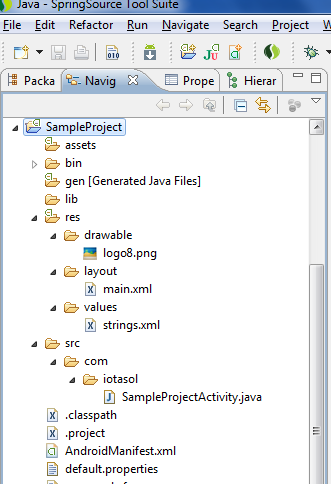 Name of folder itself will tell you little about what that folder will going to contain.
Let's start with them one by one and see if what you thought is right or otherwise.
1) res -> This folder contains all the resources which will be used inside applications. There are different folders for different type of resources
a) drawable -> This will contain all the images which you will be using in your application.
b) layout -> This folder will contain xml files. These xml files actually define the layout of different screens of our application. Android provides a facility to define your screen
Name of folder itself will tell you little about what that folder will going to contain.
Let's start with them one by one and see if what you thought is right or otherwise.

1) res -> This folder contains all the resources which will be used inside applications. There are different folders for different type of resources

  a) drawable -> This will contain all the images which you will be using in your application.

  b) layout -> This folder will contain xml files. These xml files actually define the layout of   different screens of our application. Android provides a facility to define your screen
design in xml.  We will discuss these files in our later tutorials in more details

  c) values -> This folder contains different files for different type of key value pairs,
which you will be using in your application. These files help in moving various type of constants from java code to configurable xml files. These have various advantages also such as ii8n, re-usability and maintenance of constants and many more to explore.
- String
- Dimensions
- Colors etc.
d) raw -> This folder will contain files other than images such as music files, video files and other supported files.
2) src -> This folder contain all your java code
3) lib -> This folder contain all external api jars which you want to use in your applications
4) gen -> This is also java folder which is automatically generated by android. It will create a R.java file which will have mapping for all files under /res folder. You can read more about R file from
5) AndroidManifest.xml -> This is configurable file for android application, this files contains configurations such as
a) Minimum SDK application will be running on
b) Different Uses Permission Application required
c) Starting Screen of application
d) And many more to explore
I hope this tutorial will help you in starting with android. We will soon be releasing other tutorials of these series.
Please share your comments and ratings, these will help us in improving and reaching more and more people.
You can also mail us on info@iotasol.com, or follow us on twitter @iotasol
You can also visit our websites www.iotasol.com and www.iotadomains.com


A full stack Python developer course covers backend development and frameworks.It focuses on real application building.Practice ensures mastery.This full stack Python developer course supports job readiness.It is career oriented.
ReplyDeleteJoin OnlineITGuru to learn UI/UX design online. Create stunning interfaces, improve user experience, and build a strong portfolio for a digital design career.training ui ux
ReplyDeleteLearn Java online with OnlineITGuru. From basics to advanced topics, master coding, OOP, databases, and build professional applications for your career.learn java online
ReplyDeleteMaster data modeling with OnlineITGuru. Design databases, create ER diagrams, apply normalization, and manage data efficiently for real-world applications.data modeling certification course
ReplyDeleteLearn DevOps online with OnlineITGuru. Implement CI/CD, automation, cloud deployment, and containerization to streamline software delivery and operations.devops training courses
ReplyDeleteEasyPayTax helps individuals and businesses file taxes quickly and accurately with expert guidance and simple online tools. income tax filing services in Hyderabad
ReplyDelete"Enhance your career with salesforce developer course , designed to teach you Apex, Lightning, and Salesforce platform skills. Gain hands-on experience and become a certified Salesforce developer ready for real-world projects."
ReplyDeleteBoost your career with salesforce admin certification classes designed for beginners and professionals alike. Learn hands-on skills, real-world scenarios, and exam-focused strategies to become a certified Salesforce Administrator.
ReplyDelete